Getting Started
Everything you need to know as a new player
On this page
Joining the Server
In order to connect to the GGPlays realm (see the join page for the confirmed address), you'll need the Cobblemon 1.8.1 installed on a Fabric 1.21.1 client. For the best experience, use our official Modrinth or CurseForge modpack.
Please review our official server rules before playing. If you need help, don't be afraid to ask a staff member in-game, or make a ticket in our official discord server in the #ticket-support channel.
Choose Your Starter
When you join for the first time, make sure your party is empty and press M to open the starter selection screen. You can only claim your starter once, so choose carefully!
Exploring the World
Random Teleport
Select a world within the /rtp menu to teleport to a random location where you can begin exploring, battling, and catching wild Pokémon.
Warps
Open /warps to browse important server warps and community locations. Warps are one of the fastest ways to reach useful areas, discover player builds, and access server features.
Some warps shown in /presents contain hidden presents throughout the area. Right-clicking those presents rewards you with free items, making them a good early stop for new players.
Building Your Base
Once you find a location you want to settle in, your next priority should be protecting it.
Use /kit claim to receive a Claiming Tool. Hold it in your main hand, then right-click two opposite corners of the area you want to protect. When your claim is created successfully, gold blocks will temporarily outline the full boundary of the claimed region.
After your base is established, stand in a safe location and use:
/sethome <home name>to create a home/homesto view all of your homes/home <home name>to teleport back to one of them
Setting a home is important. It gives you a reliable return point after exploring, mining, catching Pokémon, or visiting server warps.
Cobblemon Basics
Controls
The following table contains the most important default controls and Pokémon management shortcuts:
| Control | Action |
|---|---|
Arrow Keys (↑ and ↓) | Change your selected Pokémon |
R | Throw or recall your selected Pokémon |
O | Toggle the party overlay |
M | Open the Party Menu to view stats, moves, and evolution options |
| Crouch + Right Click on a Pokémon | Open the Interaction Wheel to manage the Pokémon, equip items, mount or dismount, and more |
/pc command | Open your PC |
Healing Machine
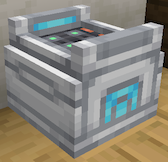
Healing Machines restore the HP and status of the Pokémon in your party upon being right clicked. Public Healing Machines are available at /warp PokeCenter, but you can also buy one in /shop or craft one yourself.
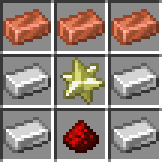
Healing Machine Recipe
- 4x Iron Ingot
- 3x Copper Ingot
- 1x Max Revive
- 1x Redstone
Poké Balls
Poké Balls are one of the most important items in Cobblemon, and are used to catch wild Pokémon for your team and to progress your PokéDex. You can catch Pokémon in two main ways:
- Throw a Poké Ball directly by holding it in your hand and right-clicking the target
- Use a Poké Ball during battle after weakening the Pokémon first
If you throw a Poké Ball and miss, it will drop on the ground and can be picked back up. Catch rates improve when the target has low HP or a status condition. Poké Balls can be purchased in /shop or crafted with ores, apricorns, and tumbestones.
Free Rewards
| Source | Reward |
|---|---|
| Link your Discord account |  Shiny Key Shiny Key |
| Use the Official Modpack |  Random Shiny Pokémon Random Shiny Pokémon Access to Access to /kit modpack +1% Shiny Spawn Rate Boost +1% Shiny Spawn Rate Boost |
| Vote |  5 Vote Points 5 Vote Points 100 Claim Blocks 100 Claim Blocks |
| Refer a Friend |  Cosmetic Key Cosmetic Key |
| WonderTrade | Random Pokémon |
What To Do Next